MuADMINS
Solutions
Short fixes for common MU Online server, client and website problems, each with its source and date. “Confirmed” means the person who asked said the fix worked.
25 solutions for “/move” in Gameplay · Clear
0.97d+99i: /move stadium sends the character to the soccer area.
1. 97d+99i files have no MoveReq.txt. 2. Edit line 50 in the server Gate.txt and in the client Gate.bmd. 3. Save both and test.
✓ Confirmed by the topic starterImperyus Games Brasil · 2011-06-30/move arena sends the player to the wrong place (version 1.01E); the client Gate.bmd looks empty
The gate coordinates are on the server in Gate.txt; the client only has the built Gate.bmd. 1. Enter the game, use /move arena and note the coordinates where it sends you. 2. Open the ser...
✓ Confirmed by the topic starterDarksTeam · 2009-04-30Game Master command /gmove does not work (DarksTeam 97d)
1. Make sure the Beta 41.1 patch of the files is applied. 2. Use the original message_kor.wtf that came with the files (a different message file breaks the command). 3. Restart the GameSe...
✓ Confirmed by the topic starterDarksTeam · 2019-08-26Aida added to the M (move) window, but choosing it leaves the character in Lorencia
The move gate pointed to the wrong map number. 1. Open the server Gate.txt and find the gates used by your Aida move entries (in the thread gates 119 and 140). 2. The map column must be 3...
✓ Confirmed by the topic starterTUServerMU · 2023-08-26Louis S6E3 update 13: how to change or limit the /bar move command.
1. Open MuServer/Data/Custom/CustomMove.txt. 2. Find the /bar line and change its MinLevel (the thread set 50) or its other values. 3. Reload the GameServer.
✓ Confirmed by the topic starterTuServerMU · 2020-05-19In a 97d+99i client the D key (trade, party) and the M key (map move) do nothing (DarksTeam files).
This is expected: those features exist only from 0.99b clients. 97d+99i is a community mix, so the keys will not work there.
✓ Confirmed by the topic starterTuServerMU · 2017-06-30How do I remove the timed (expiring) starting items new characters get?
1. Open MuServer/Data/Custom/CustomStartItem. 2. Remove or edit the starting item lines. 3. Restart the GameServer.
✓ Confirmed by the topic starterCreandoMU · 2021-06-03How do I remove the 5% HP recovery option from level 3 wings?
1. Open ItemOption.txt. 2. Find ITEM_OPTION_ADD_HP_RECOVERY_RATE = 85. 3. Remove that line or set its value to 0, then restart.
✓ Confirmed by the topic starterCreandoMU · 2020-12-29MuEmu (Emerson repack update 25): new characters get welcome items; where is that removed? It is not a SQL script
1. The start items are given by the server file MuServer\Data\Custom\CustomStartItem.txt, not by a database script. 2. Remove or comment the item lines there (or switch the system off in...
✓ Confirmed by the topic starterTUServerMU · 2021-06-03A newly added custom item disappears when the character moves to Crywolf
Crywolf runs on GameServerCS, which did not know the new item. 1. After adding items, reload or restart every GameServer, including GameServerCS, so all of them load the same item list. 2...
✓ Confirmed by the topic starterTUServerMU · 2020-09-16Moving to Lorencia with M lands on the wrong coordinates (inside the castle area).
1. Find the gate number of that move in the client movereq. 2. Edit its coordinates in the server Gate.txt (and Gate.bmd in the client if needed). 3. The asker only needed to change the c...
✓ Confirmed by the topic starterImperyus Games Brasil · 2010-05-26Moving to the stadium says you do not have the required level (DarksTeam 97d+99i)
In these files the move levels are not in movereq.txt or gate.bmd. 1. Open DTData\MoveSystem.dat. 2. Change the level of the stadium (and other) move entries. 3. Restart the GameServer.
✓ Confirmed by the topic starterDarksTeam · 2012-01-29How to disable or remove a skill (the Dark Lord Chaotic Diseier skill) from the server
1. Open the server skill list in the Data folder (Skill.txt). 2. Put // at the start of the skill line to comment it out (in the thread: //238 "Birds" 190 50 15 0 6 0 ...). 3. Restart the...
✓ Confirmed by the topic starterTUServerMU · 2020-12-25'Not allowed to use in this location' when using warp next to the Chaos Machine in Noria (MuEmu Emerson Up27)
1. This is not a terrain bug: the MuEmu GameServer source has a check in Move.cpp that blocks moving while the character stands between X 177 Y 100 and X 183 Y 106 in Noria (the Chaos Mac...
✓ Confirmed by the topic starterRaGEZONE · 2025-01-29ExTeam S6E3: moving to Dungeon (also with the GM move command or by walking through the entrance) sends the character straight back to Lorencia; other maps work.
1. Check that World2/Object2 exist in the client and that gates.txt has the Dungeon (map 1) gates. 2. The real cause was the Dungeon Siege event config, which locks the map. 3. Disable Du...
✓ Confirmed by the topic starterRaGEZONE · 2021-04-11MuEmu S6 E3 Castle Siege: when the battle starts the defending guild shows as attacker, with no config change
The Castle Siege data stored in SQL had gone bad. 1. Back up the database first. 2. The asker cleared the SQL tables used by Castle Siege (in MuEmu databases they are the MuCastle_ tables...
✓ Confirmed by the topic starterTUServerMU · 2020-11-15Louis files: killing a certain monster (Hound) shows numbers in the middle of the screen
It is not the experience message setting: a custom monster mod had an announcement set for that monster. 1. Open the CustomMonster config of your files and find the line of that monster....
✓ Confirmed by the topic starterTUServerMU · 2020-11-05A dialog box appears and the character cannot enter Barracks (Balgass Barracks)
The character had been changed with an editor and had not done any quest, so the Barracks entry check failed. 1. Use a character that really did the required quests (in Season 6 the Barra...
✓ Confirmed by the topic starterTUServerMU · 2020-08-08Louis S6 EP3: how to disable the VIP purchase option for now
1. On Louis S6 Episode 3 files the VIP purchase options are set in MuServer\Data\Custom\CustomBuyVip (server side). 2. Edit that file to switch off or remove the VIP packages you do not w...
✓ Confirmed by the topic starterTUServerMU · 2020-08-06Entering the Arena (Stadium) keeps throwing the character back to Lorencia or makes it glitch and jump around
1. The Arena terrain (.att) on the server does not match the client one, so the server rejects positions that the client allows and moves you back. 2. Use the same terrain on both sides:...
✓ Confirmed by the topic starterRaGEZONE · 2022-08-21
Videos on MUTube
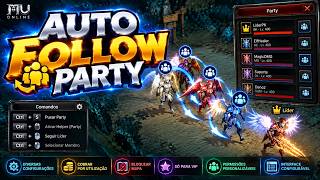 Script Lua Move Party | Auto Follow Party - MU Online - Louis / Matrix
PZDEV · 1:40 · 2026
 Swim Movement in Custom Maps | MU Online 1.04j
KyBeX-Developer · :23 · 2024
 Move List Sincronized with MuServer 97 - kayito
Nicolás Muratona · 1:40 · 2022
 Criando Novos Moves Muemu
QualQuerCoisa: MuOnline · 7:47 · 2018