MuADMINS
Soluções
Correções curtas para problemas comuns de servidor, cliente e site de MU Online, cada uma com a fonte e a data. “Confirmado” significa que quem perguntou disse que a correção funcionou.
40 soluções para “m window” em Cliente do jogo · Limpar
Official MU Online: Windows Defender / Windows Security flags MU files and the game will not start (December 2025).
1. Webzen says the false detection is resolved: update Windows Defender to the latest version (the notice lists 1.441.707.0). 2. If it is still blocked, Webzen's earlier notice (2 Decembe...
✓ Confirmado pelo autor do tópicoMU Online official (Webzen) · 2025-12-04main.exe closes about one second after start on Windows 7 (after reinstalling the PC)
1. Right click main.exe > Properties > Compatibility. 2. Tick Run this program in compatibility mode and choose Windows XP (or Windows 98). 3. Start the game again.
✓ Confirmado pelo autor do tópicoDarksTeam · 2010-09-06Flawless Emulator S6: maps removed from Data/Move/Move.txt still show in the warp command window (they just do not teleport).
1. The warp window list comes from the client file MoveReq.bmd, not only the server Move.txt. 2. Open the client Data/Local MoveReq.bmd in a BMD editor and delete the map rows (or set the...
✓ Confirmado pelo autor do tópicoRaGEZONE · 2024-10-28Teleporting to Peace Swamp gives 'Data\Local\Minimap\Minimap_World57_Eng.bmd - File corrupted' in the open source client cloned on Windows 11.
The file gets damaged by git clone on Windows. Download the repository as a .zip or copy that one file manually from GitHub; both load without error.
✓ Confirmado na issueGitHub (sven-n/MuMain) · 2026-07-11Windows 10 players reach the login screen but cannot enter, while Windows 7 players play fine (Season 2 namech files).
Compatibility mode and sandboxing did not help. Replace main.exe with one from a different client (the old main.dll was removed), then set the serial to match the server. After that Windo...
✓ Confirmado pelo autor do tópicoRaGEZONE · 2016-02-20Windows 10: the inventory and skill menus are invisible or transparent (Season 8 client, Intel HD graphics).
1. Remove the current Intel display driver through Device Manager (not Add/Remove Programs). 2. Install an older Intel HD Graphics driver (people used the Windows 8.1 or HD 4000 driver)....
✓ Confirmado pelo autor do tópicoRaGEZONE · 2023-02-03MUOnlineSetup: how do I change the MU client resolution, window mode and sound without editing the registry?
1. The MU client keeps music on or off, sound effects on or off, window or full screen mode and the resolution in the Windows registry, which is tedious to edit by hand. 2. MUOnlineSetup...
Season 3: some maps in the M (move) window stay red as if the level is too low, although movereq.bmd and the server move list are right and /warp works
1. Rename the map entries in the move list, for example Lorencia with a capital L, or number them like 1-Lorencia, 2-Noria, 3-Devias. 2. Make the same change in the client movereq.bmd and...
✓ Confirmado pelo autor do tópicoRaGEZONE · 2018-08-15How do I remove the resets number shown in the character window (C) in game?
1. The text comes from the client custom messages, not from the server. 2. Open the MAIN_INFO folder and edit CustomMessage.txt: change Level: %d | Resets: %d to Level: %d. 3. Run GetMain...
✓ Confirmado pelo autor do tópicoRaGEZONE · 2021-03-14Season 9 client: how do I remove the pop-up window that opens as soon as you enter the game?
1. The pop-up is the event notice interface of the client. 2. Delete (or move out) Data\Interface\GFx\Notice\Eventnotice.OZP from the client. 3. Start the client again; the pop-up is gone...
✓ Confirmado pelo autor do tópicoRaGEZONE · 2018-07-18On Windows 10, after closing the game with Alt+F4, the MHP antihack keeps blocking players 'temporarily' with no reason (Louis S6 Update 4 TSM FirePremium).
1. Open MHPServer.ini in the MHPServer folder. 2. Set MemoryGuardNumber to 2 (one helper needed 3). 3. Check that the dump list does not flag normal programs. Restart MHPServer.
✓ Confirmado pelo autor do tópicoTuServerMU · 2020-08-02After upgrading Windows 8.1 to 10 the client shows graphic artifacts in window mode (ATI card).
The ATI OpenGL file atioglxx.dll was missing although the client gave no error. Restoring atioglxx.dll (part of the AMD/ATI display driver) fixed it.
✓ Confirmado pelo autor do tópicoRaGEZONE · 2015-12-26The whole PC slows down (mouse lag) when the windowed client is not in focus (ZxGames V6.0 Full Premium files).
In MainInfo.ini set CustomInterfaceType = 0 (S6 original). Type 4 (Legends) caused the lag. Then regenerate the client main files.
✓ Confirmado pelo autor do tópicoTuServerMU · 2025-07-18Game freezes when you click outside the client window (Louis update 43)
1. Close the game. 2. Check that Settings.ini is in the client folder. In the topic starter's client it was missing. 3. Copy Settings.ini from the original client package of the same upda...
✓ Confirmado pelo autor do tópicoTUServerMU · 2026-08-05Louis S8 update 37: the M move window opens but clicking a city does not move the character.
1. The client files did not match the server update. 2. Update the client files to the same update as the server (37). 3. Test the move window again.
✓ Confirmado pelo autor do tópicoCreandoMU · 2024-05-19MuEmu S6 (update 13 files): where to change the text shown in the Buy VIP window
1. The Buy VIP window texts are client side, in the MainInfo source files. 2. Edit CustomMessage.txt and CustomBuyVip.txt in the MainInfo folder with your own VIP names, prices and info....
✓ Confirmado pelo autor do tópicoTUServerMU · 2020-08-25Cash shop (Namech S2 5.0.1 client) shows strange symbols instead of text
1. The text is fine: Windows lacks the fonts the cash shop uses. 2. Open Control Panel > Regional and Language Options > Advanced (Windows XP), choose English in the list and tick the Eas...
✓ Confirmado pelo autor do tópicoRaGEZONE · 2012-04-27Text.bmd: the CashShop window shows strange characters for Portuguese words with ç or accents
1. The strange characters come from letters such as ç and accented letters that this main does not display. 2. Edit text.bmd in Data\Local and replace the word, for example preço with Val...
✓ Confirmado pelo autor do tópicoImperyus Games Brasil · 2012-06-03MuOnline Clone (MuMono): the program exits at start with code -532462766 (0xe0434352)
1. The asker fixed it by adding the DirectX package of MonoGame to the project: dotnet add package MonoGame.Framework.WindowsDX --version 3.8.6.0. 2. Build and start MuMono.exe again.
✓ Confirmado na issueGitHub (bernatvadell/muonline) · 2026-10-15Kayito 0.97k: a Release build of main.dll crashes when entering the game with a character, the Debug build works.
1. The bug is in Window.cpp, function ChangeWindowText: the local char text[256] array goes out of scope before the window uses it. 2. Remove that local variable and make it a member of t...
✓ Confirmado na issueGitHub (nicomuratona/MuEmu-0.97k-kayito) · 2024-11-26
Vídeos no MUTube
 COMO CRIAR SERVIDOR DE MUONLINE 97D CLASSICO WINDOWS 10
Kiuzs · 18:21 · 2021
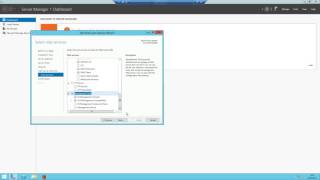 Como instalar SQL Server 2008/2012 no Windows? [MuOnline, Cabal, etc]
FireServers · 5:36 · 2017
 MuOnline Remaster / Mu-Classic Beta World showcase / Windows,MacOs,Linux
MuClassic · :46 · 2026
 Servidor MU 97x en 2026 + SQL Server 2019 en Windows 11
ReyLoco · 29:40 · 2026